With a license subscription, you pay an annual fee to use AnyDesk. Your subscription renews automatically unless you cancel it before the renewal deadline.
If you have a saved payment method, it will be charged automatically when your payment is due. Otherwise, you’ll need to pay your invoice by the due date using one of the available payment methods.
Renew license subscription
You can renew your subscription for another year in the my.anydesk management portal. After renewal, it continues automatically each year.
💡 NOTE
If you purchased your license through the webshop, auto-renewal is turned on by default.
Before you renew, ensure you:
Don’t have any unpaid invoices. If you do, pay them before renewing.
You’ll get an email reminder 30 days before your license expires.
🚨 IMPORTANT
You must cancel your subscription at least 30 days before your renewal date to avoid automatic renewal, unless your agreement specifies a different deadline. Otherwise, your subscription will automatically renew for another year.
To renew your license subscription in my.anydesk II:
Go to the License tab.
In the Subscription section, click Renew Subscription.
.png)
In the confirmation dialog, select Yes, renew subscription.
To renew your license subscription in my.anydesk I:
Go to Settings.
On the General tab, scroll down to the bottom of the page and click Renew Subscription.
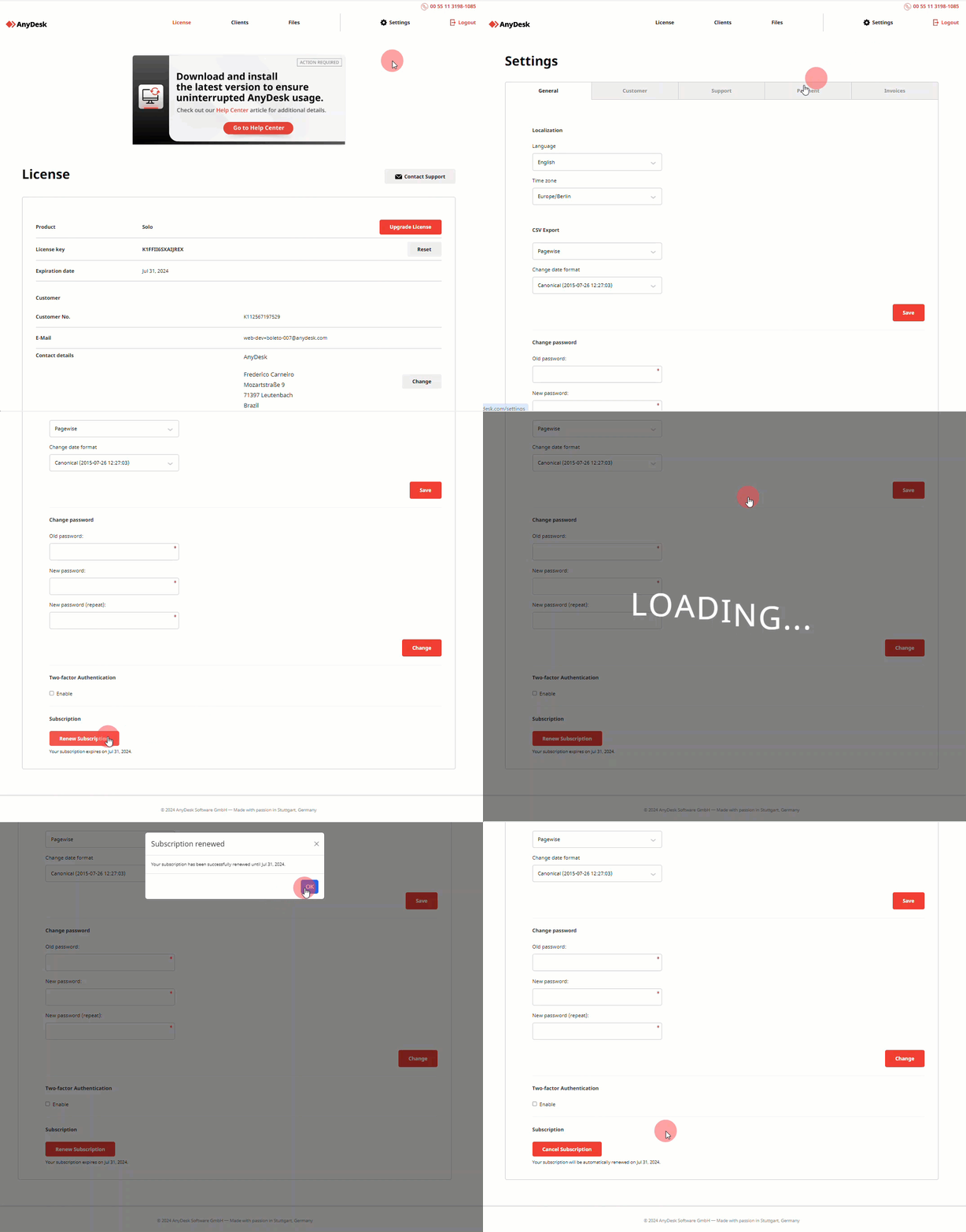
In the confirmation dialog, select Yes, renew subscription.
Once renewed, your payment method will be charged on the renewal date, and your license will be extended for another year.
Cancel license subscription
By default, licenses purchased through our online store are set to auto-renew annually.
If you want to stop auto-renewal, you can cancel the subscription through my.anydesk. Your license will remain active until the end of the current billing period.
🚨 IMPORTANTYou must cancel your subscription at least 30 days before license renewal date to avoid automatic renewal, unless your agreement specifies a different cancellation deadline.
To cancel your license subscription in my.anydesk II:
Go to the License tab.
In the Subscription section, click Cancel Subscription.
In the confirmation dialog, select Yes, cancel subscription.
To cancel your license subscription in my.anydesk I:
Go to Settings.
On the General tab, scroll down to the bottom of the page and click Cancel Subscription.
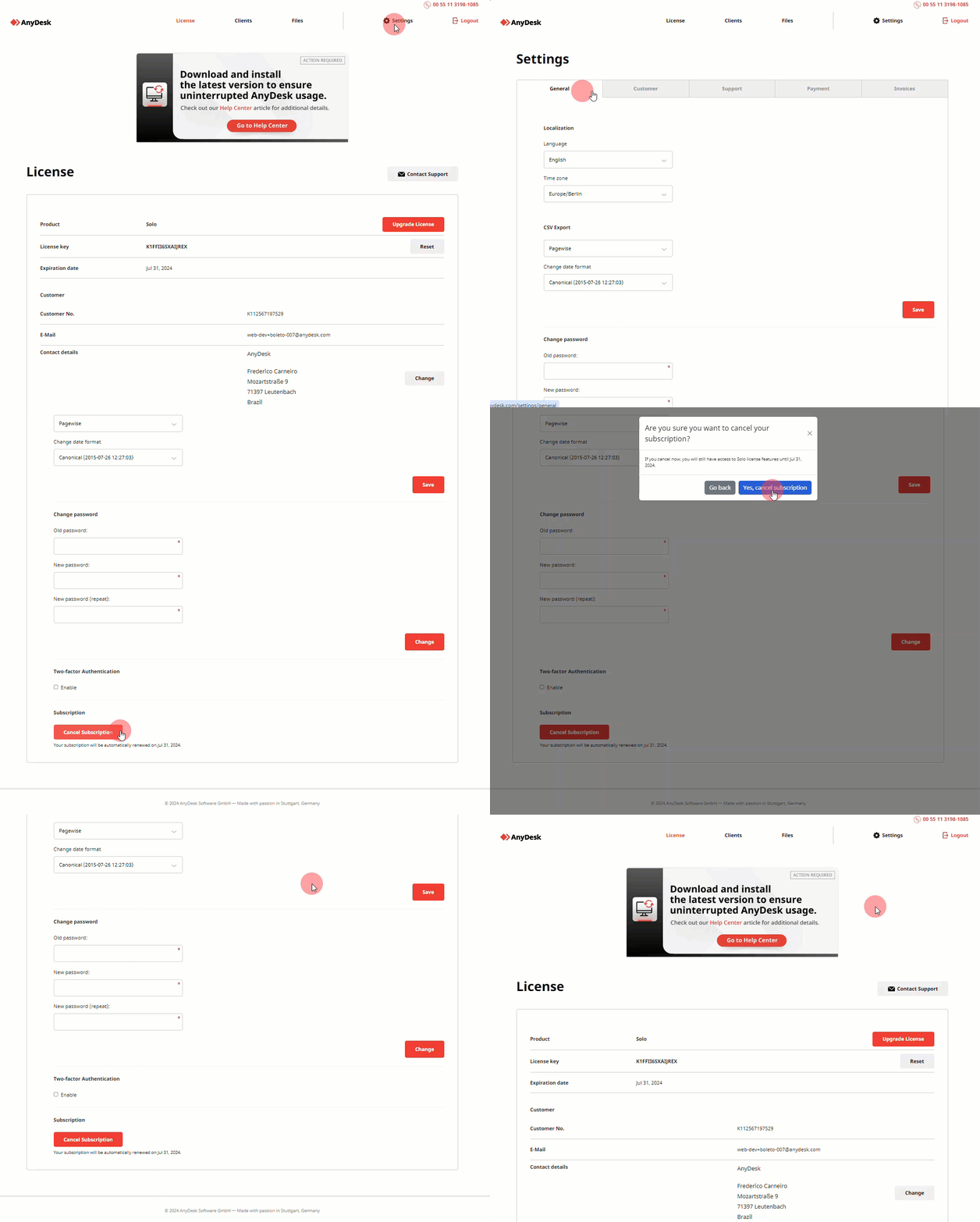
In the confirmation dialog, select Yes, cancel subscription.
After you cancel your subscription, your paid license stays active until the end of your current billing period. After that, your paid license and its features will no longer be available.
If you want to continue using AnyDesk for business or professional purposes, you will need a paid license.
Before your subscription ends, make sure to export any data you need. You must also follow the requirements in our Terms & Conditions, including uninstalling AnyDesk if required.
FAQ
What is the notice period for canceling my license?
You must cancel your license at least 30 days before the renewal date to avoid automatic renewal, unless your agreement specifies a different deadline. For more information, please refer to our Terms & Conditions.
How long does my contract last?
Each license contract is valid for 12 months (1 year), unless otherwise agreed in writing.
Does my license end on the cancellation date?
No, your license remains active until the end of the billing period.
For example: If your license is valid from January 1, 2024, to January 1, 2025, you can use it until January 1, 2025, even if you cancel earlier.
Do I need to renew my license manually each year?
No, your subscription renews automatically each year unless you cancel it before the renewal deadline or your agreement specifies otherwise.
You can manage your subscription details anytime in the my.anydesk management portal.